Quick Answer
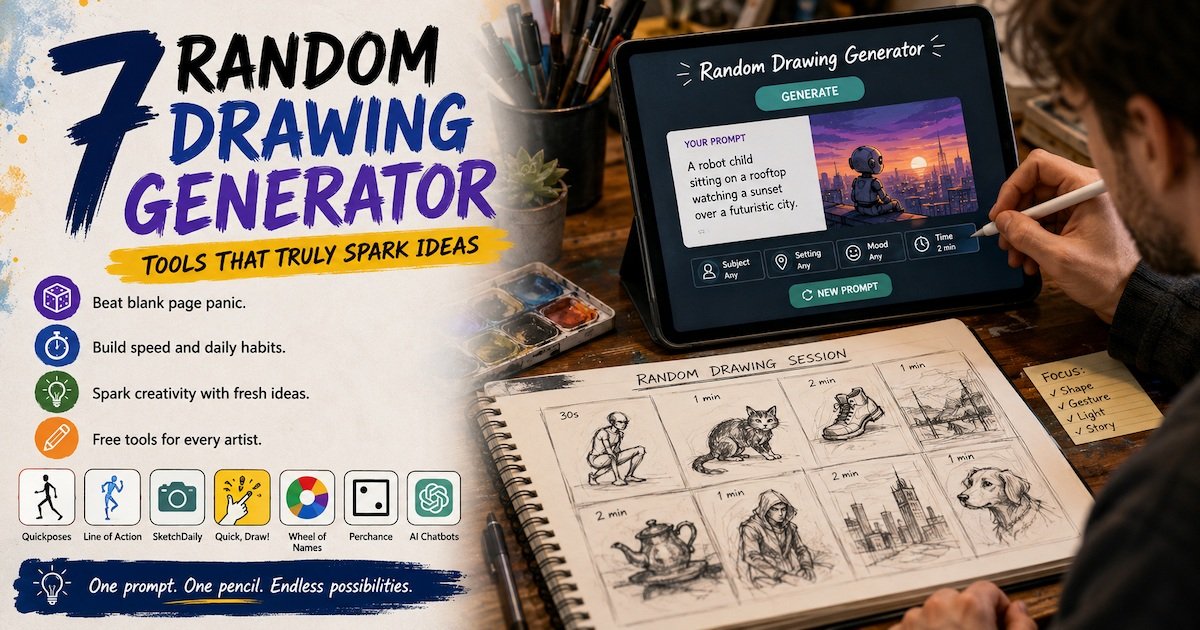
A random drawing generator is a free tool that picks a drawing idea for you. You press one button. It gives you a subject, a word, a pose, or a photo to draw. Artists use it to beat blank page panic, warm up faster, and keep a daily habit going. Good picks include Quickposes, Line of Action, SketchDaily, and Google Quick, Draw!.
What Is a Random Drawing Generator?
Definition: A random drawing generator is a web app, wheel, or AI prompt tool that returns a drawing idea at random. It removes the choice from you. Instead of deciding what to draw, you accept what the tool gives you and start moving your pencil.
The idea is simple, but the effect is real. Most artists do not stall because they lack skill. They stall because they have too many options. A blank page offers infinite choices, and infinite choices freeze people.
A random drawing generator cuts that problem down to one option. You get a prompt. You draw it. That is the whole loop.
Some people call it a drawing randomizer. Others call it a drawing prompt generator, a sketch idea picker, or a what to draw generator. These names all point to the same thing.
Key Takeaways
Key Takeaway Box
- A random drawing generator gives you one idea instead of a hundred choices.
- The best tools are free and need no account.
- Timed pose tools build speed. Word tools build imagination.
- You can build your own random drawing generator with a spinner wheel in five minutes.
- AI chatbots now work as a flexible random drawing generator when you write a clear prompt.
How a Random Drawing Generator Works
Most of these tools follow the same four steps under the hood. Here is the process in plain language.
- A list is stored. The tool holds a list of words, poses, photos, or themes. Some lists have 100 items. Some have millions.
- You set your filters. You may choose a category, a time limit, or a difficulty level. Many tools skip this step and just run.
- The tool picks at random. A small piece of code selects one item from the list. Every item has the same chance of being picked.
- You get the prompt. The result shows on screen. You start drawing. Then you press the button again for the next one.
Better tools add one more layer. They mix two or three lists. So instead of "cat," you get "a cat wearing armor in a rainy alley." That mix is where a drawing prompt tool becomes genuinely useful for creative work.
5 Types of Random Drawing Generators
Not every tool does the same job. Pick the type that matches your goal.
| Type | What It Gives You | Best For | Session Length |
|---|---|---|---|
| Word prompt tool | A noun or short phrase | Imagination and doodling | 5 to 20 minutes |
| Pose reference tool | Timed photos of people | Figure drawing and anatomy | 30 to 60 minutes |
| Object reference tool | Photos of animals, hands, or objects | Observation practice | 20 to 45 minutes |
| Spinner wheel | Your own custom list | Classrooms and group games | Any length |
| AI prompt tool | A written scene you describe | Story art and concept work | Any length |
A word tool asks your brain to invent. A photo tool asks your eyes to observe. Both matter. Most artists need a mix of the two each week.
7 Best Random Drawing Generator Tools to Try
These tools have been around for years and stay free to use. Always check current pricing on the site itself, since terms change.
1. Quickposes
Quickposes shows timed human poses. You pick a time limit from 30 seconds up to 10 minutes. The tool then runs a set of photos back to back.
Best for gesture drawing. The short timer stops you from fussing over small details. You learn to catch the whole shape first.
Filters include gender, clothing, and pose type. There are also hands, animals, and urban scenes.
2. Line of Action
Line of Action is one of the oldest free practice sites for artists. It offers figure practice, animals, hands and feet, faces, and still life.
You set the class length and the interval, then it plays like a real-life drawing session. It also has a small library of drawing lessons that explain what to look for in each pose.
This is the closest thing to a studio class that a random drawing generator can give you at home.
3. SketchDaily Reference Site
SketchDaily pulls reference photos and lets you set very specific filters. You can request a full body pose, a certain age range, or a specific body type.
The interface is plain, but the control is excellent. Illustrators who need a particular angle often use this one over the prettier options.
4. Google Quick, Draw!
Quick, Draw! is a browser game from Google. It names an object, gives you 20 seconds, and a neural network tries to guess your sketch while you draw.
It works as a fast random drawing generator with a fun twist. The pressure is high, so you stop overthinking. Kids love it, and it teaches adults to simplify shapes.
5. Wheel of Names or Picker Wheel
These are custom spinner tools. You type your own list of ideas, then spin.
This is the flexible option. A teacher can load 30 classroom themes. A comic artist can load 20 character types. You control every entry, so the results always fit your project.
Building your own prompt picker this way takes about five minutes.
6. Perchance Generators
Perchance hosts thousands of community-built generators, including many for art prompts. Some mix a subject, a setting, and a mood in one click.
Quality varies because anyone can publish. Try a few, then bookmark the two or three that give you strong results.
7. AI Chatbots as a Prompt Engine
ChatGPT, Claude, Gemini, and Microsoft Copilot all work well here. You are not asking them to draw. You are asking them to think of ideas.
Try this prompt: "Act as a random drawing generator. Give me one sketch idea. Include a subject, a setting, a light source, and a mood. Keep it under 25 words. Do not explain it."
The advantage is control. You can ask for ideas that match your skill level, your medium, or a series you are already working on. This is where a random drawing generator stops being generic and starts serving your actual goals.
Comparison Table: 7 Tools at a Glance
| Tool | Prompt Type | Timer | Account Needed | Best Use |
|---|---|---|---|---|
| Quickposes | Photo poses | Yes | No | Gesture practice |
| Line of Action | Photo poses and objects | Yes | Optional | Full study sessions |
| SketchDaily | Filtered photos | Yes | No | Specific references |
| Quick, Draw! | Object words | Yes, 20 seconds | No | Fast warm ups |
| Wheel of Names | Your own list | No | No | Classes and groups |
| Perchance | Mixed text prompts | No | No | Story ideas |
| AI chatbots | Custom text prompts | No | Usually yes | Tailored practice |
Real Example: What Quick, Draw! Proved About Random Prompts
Google launched Quick, Draw! in 2016 as an experiment in machine learning. Players got a random word and 20 seconds to sketch it.
The response was huge. The public dataset that came out of it holds more than 50 million drawings across hundreds of categories. Researchers still use that data today to study how people simplify shapes.
Here is the part that matters for artists. Almost none of those 50 million drawings are good. They are rushed scribbles. But millions of people drew something instead of nothing, because a machine handed them a word and started a clock.
That is the honest case for using a random drawing generator. It does not make you talented. It makes you start.
You can try the experiment yourself at Google Quick, Draw! and see how few strokes you actually need.
How to Use a Random Drawing Generator: 8 Steps
Follow these steps for a session that builds real skill instead of filling pages with half-finished sketches.
- Pick one goal. Speed, shape, anatomy, or imagination. One per session.
- Choose the matching tool. Poses for anatomy. Words for imagination.
- Set a timer. Two minutes per sketch is a strong default for warm ups.
- Accept the first result. Do not reroll. Rerolling brings back the choice problem you were trying to escape.
- Draw for the full time. Keep the pencil moving even when the drawing looks wrong.
- Stop when the timer stops. Turn the page. Do not fix it.
- Do six to ten rounds. That is usually 20 to 40 minutes.
- Review at the end. Circle the one line in each sketch that worked. Ignore the rest.
That last step is the one most people skip. Review turns practice into progress.
Best Practice: Use a random drawing generator as a warm up, not as your whole practice. Spend the first 20 minutes on random prompts. Spend the rest on a project you actually care about. Random prompts loosen you up. Real projects build finished skill.
Random Drawing Generator vs AI Image Generator
People mix these up often. They do very different jobs.
| Feature | Random Drawing Generator | AI Image Generator |
|---|---|---|
| What it makes | An idea or reference | A finished picture |
| Who draws | You | The model |
| Main benefit | Practice and habit | Speed of output |
| Skill gained | Drawing skill | Prompting skill |
| Good for artists | Yes, directly | As a mood board |
A random drawing generator hands you the assignment. An AI image generator hands you the result. If your goal is to get better at drawing, the first one is the tool you want.
Many artists use both. They generate a random prompt, sketch it themselves, then use an AI image tool to explore color options. That order keeps your hand skills growing.
Where AI Tools Fit Into a Creative Workflow
Drawing practice is one small corner of a much wider AI tool landscape. If you draw professionally, or you run a small studio, the tools around your art matter as much as the sketching itself.
For creators who publish videos or tutorials, our guide to the top AI avatar tools for multilingual voiceovers covers how to reach viewers in other languages without rerecording. Illustrators selling prints or merchandise often start with the best AI tools for Facebook and Instagram ad creatives, since ad visuals decide whether the work gets seen at all.
If you handle client questions on your own site, our breakdown of AI-powered chatbot platforms explains which setups suit a one-person shop. Studios growing past that stage usually need a base stack first, and our list of top SaaS tools for startups is a practical place to begin.
For agencies chasing commercial work, the best sales intelligence tools for B2B contact data help you find the right buyer instead of guessing. Larger teams weighing an internal rollout may prefer outside help, which our review of top AI consulting firms addresses.
Two more reads are worth your time if AI is becoming part of your career rather than just your sketchbook. Our look at AI product manager jobs maps out a role many creatives move into. And because tool choice is never only a tool choice, AI transformation as a problem of governance explains why rules and oversight decide whether adoption works.
One caution worth repeating. Not every AI tool you find online is real or verified. We looked into that directly in our investigation of the Abraham Quiros Villalba AI tool, check the source before you trust a tool with your work or your money.
Mix Your Own Prompts With This Table
You do not need software to build interesting ideas. Roll a die or pick blind from each column and combine the results.
| Subject | Setting | Light | Mood |
|---|---|---|---|
| Old fisherman | Rooftop garden | Candlelight | Calm |
| Stray cat | Subway platform | Neon sign | Tense |
| Robot child | Desert road | Full moon | Lonely |
| Market seller | Flooded street | Harsh noon sun | Busy |
| Sleeping dog | Attic full of boxes | Single window | Warm |
| Street dancer | Snowy bus stop | Streetlamp | Hopeful |
Six options in four columns give you 1,296 combinations. That is a working random drawing generator built from one table.
6 Mistakes to Avoid
Even a good tool gets used badly. Watch for these habits.
- Rerolling until you like the prompt. This defeats the point. The hard prompts teach the most.
- Drawing only what you are good at. If you always filter for faces, your backgrounds stay weak forever.
- Setting timers that are too long. Ten minutes per sketch turns a warm up into a slog.
- Skipping the review step. Sketches you never look at again teach you very little.
- Using random prompts every single day and nothing else. Random practice without finished pieces leaves you with no portfolio.
- Trusting unverified tool lists. Many sites promote tools that were never tested. Look for reviews that name real features.
How Teachers and Parents Use It
A random drawing generator works well in classrooms because it removes arguments. Nobody chose the topic, so nobody complains about it.
Practical setups that work:
- Warm-up wheel. Load 20 themes into a spinner. Spin one at the start of each class.
- Team relay. One student draws for 30 seconds, then passes the paper to the next.
- Guess the prompt. Students draw the random word, then classmates guess what it was.
- Home routine. One prompt each evening, five minutes, kept in a single notebook.
For younger kids, keep prompts concrete. https://quickdraw.withgoogle.com/ works far better than "loneliness."
Does Random Practice Actually Build Skill?
Yes, but only under two conditions.
First, you need volume. One sketch a week will not move you. Twenty short sketches a week will.
Second, you need feedback. That can be a teacher, an online critique group, or your own honest review at the end of a session. Practice without feedback repeats the same mistakes at higher speed.
Gesture drawing is the clearest case. Art schools have taught timed pose practice for over a century because it works. A random drawing generator simply brings that method to your desk without a class fee.
What it will not do is give you fundamentals you never studied. Perspective, value, and proportion still need direct study. Random prompts are the gym. They are not the textbook.
Frequently Asked Questions
Final Thoughts
The value of a random drawing generator is not the idea it gives you. Most of those ideas are ordinary. The value is that it ends the debate about what to draw and gets your hand moving within seconds.
Pick one tool from this list. Set a two-minute timer. Do eight rounds. Then move on to the work you actually care about.
That routine, repeated three or four times a week, will do more for your drawing than any amount of scrolling for inspiration.