Quick Answer
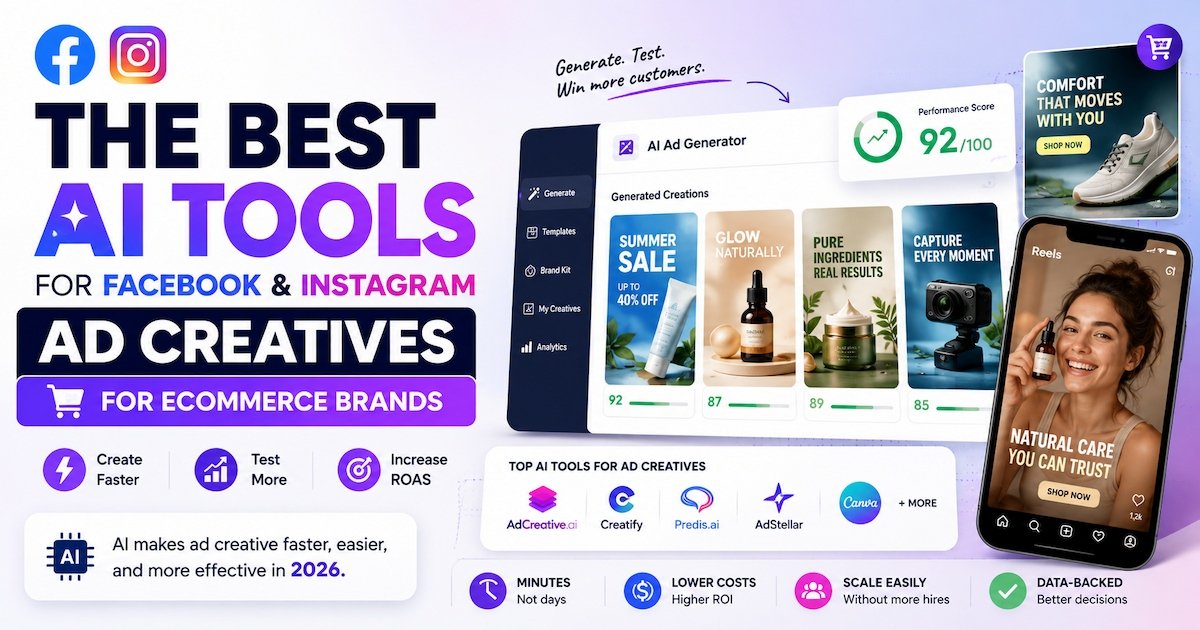
The best AI tools for Facebook, Instagram ad creatives that ecommerce teams use in 2026 are AdCreative.ai, Creatify, Predis.ai, AdStellar, Canva, Pencil, and Madgicx. Each one solves a different part of the ad creative process, from generating images and video ads to testing what actually gets clicks. Most ecommerce brands get the best results by pairing one generation tool with one testing or research tool.
Why Ad Creatives Are the Hardest Part of Facebook and Instagram Ads
Running ads on Facebook and Instagram is not the hard part anymore. Meta's ad system handles most of the targeting on its own now. The real bottleneck is creative. You need fresh images and videos every week, or your ads stop working. Audiences get tired of seeing the same ad. Click rates drop. Costs go up.
This is exactly where AI tools for Facebook Instagram ad creatives ecommerce brands lean on AI. Instead of waiting days for a designer or video editor, you can turn a product photo or a product URL into a finished ad in minutes. That speed is the whole point.
This guide breaks down the tools that actually help with this, what each one does best, what it costs, and how to pick the right one for your store.
Key Takeaway: Ecommerce ad performance in 2026 depends less on targeting and more on how fast you can test new creative. AI tools remove the production bottleneck so small teams can compete with big ad budgets.
How AI Ad Creative Generation Actually Works
Most people assume these tools just slap a filter on a product photo. That is not really what happens. Here is the general process behind most AI ad creative tools:
- You give it an input. This is usually a product photo, a product URL, or a short text prompt describing what you sell.
- The AI pulls context. Many tools scan your product page for price, description, and images automatically, so you do not have to type everything by hand.
- It generates multiple layouts. Instead of one ad, you usually get five to twenty variations with different headlines, colors, and layouts.
- Some tools score the output. Platforms like AdCreative.ai rank each variation using a predicted performance score based on patterns from past ad data.
- You export or publish directly. Depending on the tool, you either download the files or push them straight into Meta Ads Manager.
Understanding this flow matters because it tells you where a tool's strength actually sits. A tool that is great at step 3 (generating layouts) is not always great at step 4 (predicting performance). That is why many ecommerce teams pair two tools instead of relying on one.
Definition: A predicted performance score is an estimate, generated by AI, of how well a specific ad creative is likely to perform based on patterns learned from large sets of past ad data. It is a guide, not a guarantee.
What Counts as an AI Ad Creative Tool
Definition: An AI ad creative tool is software that uses artificial intelligence to generate, edit, or test the images, videos, and copy used in Facebook and Instagram ads. This can include using tools like predisAI to convert a product photo into multiple ad variations, generating AI avatars for video ads, or scoring which creative will likely perform best before you spend money on it.
These tools generally fall into four groups:
- Generation tools: create images, video, or carousel ads from a prompt or product URL.
- Video and UGC tools: produce user-generated-content style videos with AI avatars and voiceovers.
- Research tools: scan the Facebook Ad Library to find proven ad angles and formats.
- Optimization tools: connect your creatives to real ad performance data and tell you what to make next.
Most ecommerce brands only need one or two of these, not all four.
The 9 Best AI Tools for Facebook Instagram Ad Creatives Ecommerce Brands Use
Here is the full breakdown. Pricing changes often, so treat the numbers below as a starting point and confirm current pricing on each site before you buy.
1. AdCreative.ai
AdCreative.ai focuses on speed. You upload your product images and brand assets, and it generates dozens of ad variations, ranked by a predicted performance score. That scoring feature is its biggest selling point. It tells performance marketers which static ad to test first instead of guessing.
Best for: Teams that need a high volume of static ad creatives fast. Starting price: Around $21/month for solo advertisers and small teams.
Pros:
- Fast bulk generation of static ad variations
- Built-in performance scoring to prioritize testing
- Affordable entry price for small teams
Cons:
- Less focused on video ad formats
- Can feel overwhelming with too many variations if you do not have a review process
2. Creatify
Creatify makes UGC-style video ads. Think of the casual, creator-in-front-of-a-phone video format that performs well in Reels and Stories. It uses AI avatars and voiceovers, so you get an authentic-feeling video without booking a real creator for every product.
Best for: Brands that want video ads without hiring UGC creators for every shoot. Starting price: Around $33/month.
Pros:
- AI avatars and voiceovers feel close to real UGC
- Output is tuned for vertical formats like Reels and Stories
- Saves the cost of booking creators for every product
Cons:
- Video-only focus, so you still need a separate tool for static image ads
- Avatar quality can vary depending on the script and product type
3. Predis.ai
Predis.ai turns a text prompt or product URL into image, video, and carousel ads. It sits at a lower price point than most full platforms, which makes it a solid pick for smaller ecommerce stores that are just starting to test paid social.
Best for: Budget-conscious ecommerce brands that want multiple ad formats from one tool.
Pros:
- Covers image, video, and carousel formats in one place
- Accessible pricing for stores just starting with paid ads
- Works from a simple product URL, so setup is quick
Cons:
- Less deep on analytics compared to dedicated optimization platforms
- Template range is smaller than some higher-priced tools
4. AdStellar
AdStellar is a full-stack platform. It goes from product URL to a live Meta campaign, generating image ads, video ads, and UGC-style avatar creatives inside the same tool used to launch the campaign. This removes the step of exporting creatives and uploading them somewhere else.
Best for: Ecommerce brands that want creative generation and campaign launch in one place. Starting price: Around $36/month on the entry plan.
Pros:
- Combines creative generation and campaign launch, so you skip exporting files
- Works well for product catalogs that change often
- Includes HTML5 and video export for multiple ad formats
Cons:
- More useful once you are running more than one active campaign
- Higher starting price than lighter generation-only tools
5. Canva
Canva is still a workhorse for ecommerce ad creative, especially for brands with a small in-house team. Its AI features help resize designs across every Facebook and Instagram placement in one click, and its brand kit keeps colors and fonts consistent across every ad you make.
Best for: Teams that want manual control with AI shortcuts, not full automation.
Pros:
- Free tier available, low barrier to entry
- Brand kit keeps colors and fonts consistent across ads
- One-click resizing across every Facebook and Instagram placement
Cons:
- Less automated than dedicated AI ad platforms
- No built-in performance scoring or ad account data
6. Pencil
Pencil is a validation tool. Instead of generating creative from scratch, it predicts how well a finished ad will perform before you spend budget on it. This makes it a good second tool to pair with a generation platform like AdCreative.ai or Predis.ai.
Best for: Teams that already make creatives but want a second opinion before launch.
Pros:
- Helps avoid spending budget on weak creative
- Works alongside almost any generation tool
- Useful for teams that already have a design process in place
Cons:
- Does not generate creative on its own
- Predictions are estimates, not guarantees of real performance
7. Madgicx
Madgicx ties your ad creatives directly to campaign performance data. It is less about generating new images and more about telling you which creatives are actually driving sales, so you know what to make more of.
Best for: Performance marketers who want creative decisions backed by real ad account data.
Best value: Typically starts paying off around $20,000+ in monthly ad spend, so it fits growing brands more than brand-new stores.
Pros:
- Ties creative choices directly to sales and ROAS data
- Removes guesswork about which ad style to scale
- Useful for teams managing several campaigns at once
Cons:
- Overkill for brand-new stores with low ad spend
- More of an analytics tool than a creative generator
8. Foreplay
Foreplay is a research tool. It mines the Facebook Ad Library to help you find ad angles and formats that are already working for other brands in your space. It does not generate creative on its own, but it removes the guesswork of "what should we even make."
Best for: Teams that want proven ideas before they start producing new ads.
Pros:
- Saves time on brainstorming ad angles from scratch
- Useful for spotting trends across your competitors
- Pairs well with any generation tool on this list
Cons:
- Requires a paid subscription
- Does not produce finished ad assets by itself
9. Meta's Native Generative AI Tools
Meta has its own built-in generative AI tools inside Ads Manager, and they are free to use. They can generate image variations, backgrounds, and text overlays directly inside the platform you are already using to run ads.
Best for: Brands that want a free starting point before investing in a paid tool.
Best Practice: Do not try to use every tool on this list at once. Start with one generation tool and one testing or research tool. Add more only once you know exactly where your current process is slowing you down.
Comparison Table: Best AI Tools for Facebook Instagram Ad Creatives Ecommerce Teams
| Tool | Main Use | Best For | Starting Price |
|---|---|---|---|
| AdCreative.ai | Static ad generation + scoring | Fast, high-volume static ads | ~$21/month |
| Creatify | UGC-style video ads | Reels and Stories video | ~$33/month |
| Predis.ai | Image, video, carousel ads | Budget-conscious small stores | Low-cost entry plans |
| AdStellar | Full creative + campaign launch | One-platform workflow | ~$36/month |
| Canva | Manual design with AI shortcuts | Small teams wanting control | Free tier available |
| Pencil | Pre-launch performance prediction | Validating creative before spend | Contact for pricing |
| Madgicx | Creative performance analytics | Scaling brands with ad data | Best at higher ad spend |
| Foreplay | Ad Library research | Finding proven ad angles | Paid subscription |
| Meta Native AI Tools | In-platform generation | Free starting point | Free |
How to Choose the Right AI Ad Creative Tool for Your Store
Follow these steps to narrow the list down to one or two tools that actually fit your store.
- Define your bottleneck first. Are you short on images, short on video, or short on ideas? The answer decides which category of tool you need.
- Check your current ad volume. A brand testing five ads a month does not need the same tool as a brand testing fifty.
- Match the tool to your budget stage. Tools like Madgicx pay off at higher ad spend. Newer stores usually get more value from lower-cost generation tools.
- Test the free tier or trial first. Most tools on this list offer a free trial or a free plan. Use it before committing to a paid tier.
- Keep brand consistency in mind. When you generate dozens of ad variations a week, creative can drift off-brand fast. Pick a tool that locks your colors, fonts, and brand rules across every output.
- Pair one generation tool with one testing tool. Generation solves production speed. Testing tells you if the output is actually working.
Key Takeaway: The right tool depends on your bottleneck, not on which tool has the longest feature list. A store that needs video should not start with a static-only tool, and vice versa.
Real Example: How an Ecommerce Brand Might Use These Tools Together
A small skincare brand running Facebook and Instagram ads could combine a generation tool with a research tool this way:
- Use Foreplay to find three ad angles already working for similar skincare brands.
- Feed those angles into AdCreative.ai to generate ten static ad variations, ranked by predicted score.
- Use Creatify to turn the top-performing product into a short UGC-style video for Reels.
- Launch all versions and check Madgicx after a week to see which creative is actually driving sales, then repeat the process with the winner as the new baseline.
This kind of workflow, research, generation, video, then performance review, is how most ecommerce teams use AI ad creative tools in practice, rather than relying on just one platform for everything.
AI Ad Creative Tools vs Traditional Design Process
| Factor | Traditional Design | AI Ad Creative Tools |
|---|---|---|
| Turnaround time | Days to weeks | Minutes to hours |
| Cost per ad variation | High (designer or agency fees) | Low, often included in a monthly plan |
| Number of variations tested | Limited by team capacity | Dozens per week |
| Brand consistency | Manual, depends on the designer | Can be locked with brand kits and rules |
| Best fit | High-end brand campaigns | Fast-moving ecommerce testing |
This does not mean AI replaces good design. It means AI handles volume, and a human still reviews the output for brand fit before anything goes live.
Metrics to Track After You Launch AI-Generated Ad Creatives
Generating the ad is only step one. Track these numbers to know if the creative is actually working:
- Click-through rate (CTR): Shows whether the creative grabs attention.
- Cost per click (CPC): Tells you how efficient the creative is at driving traffic.
- Return on ad spend (ROAS): The real number that shows if the ad is profitable.
- Thumb-stop rate (for video): How many people stop scrolling in the first few seconds.
- Frequency: How often the same person sees the ad. High frequency with dropping CTR means it is time for a new creative.
Best Practice: Review these metrics weekly, not daily. Ad performance needs a few days to stabilize, and checking too often leads to reacting to noise instead of real trends.
Common Mistakes Ecommerce Brands Make With AI Ad Creative Tools
- Generating too many ads at once without a system to review them. Volume without review wastes ad spend.
- Ignoring brand consistency. AI-generated ads can drift off-brand quickly if you do not lock in brand guidelines.
- Skipping the research step. Jumping straight to generation without knowing what already works leads to weaker first drafts.
- Not tracking which creative actually converts. Generating ads is only half the job. You still need to review performance data regularly.
- Relying only on free tools long-term. Free tools are a fine starting point, but paid tools usually save more time once your ad volume grows.
Frequently Asked Questions
Yes. Tools like Predis.ai and Canva offer low-cost or free plans that suit stores just starting with paid social ads.
Not fully. AI speeds up production, but most brands still review and adjust creative for brand fit and quality before launching.
Yes. Most generate standard image or video assets that upload directly into Advantage+ or manual Meta campaigns.
How much do AI ad creative tools cost? Prices range from free (Meta's native tools) to around $20 to $40 a month for entry plans, with higher tiers for agencies and larger ad spend.
No. Most AI ad creative tools are built for marketers, not designers. You typically just add a product URL or photo and choose from generated options.
Start small, around 5 to 10 variations per product, then narrow down to the top performers before scaling spend behind them.
Yes. Tools like Creatify and Canva both offer formats sized specifically for Stories and Reels, in addition to standard feed ads.
Final Thoughts
The best AI tools for Facebook Instagram ad creatives ecommerce brands rely on are not about replacing your marketing team. They are about removing the slow parts of the process, so you can test more ideas in less time. Start with one tool that matches your biggest bottleneck, whether that is images, video, or knowing what to make next. Add a second tool only once the first one is actually saving you time.
If you are also exploring AI tools for other parts of your content workflow, check out our guide on top AI avatar tools for multilingual voiceovers, or read about Abraham Quiros Villalba's take on AI tools for a broader look at how AI is shaping modern marketing.
For official guidance on Meta's own AI ad features, see Meta's Advantage+ creative documentation.