Quick Answer
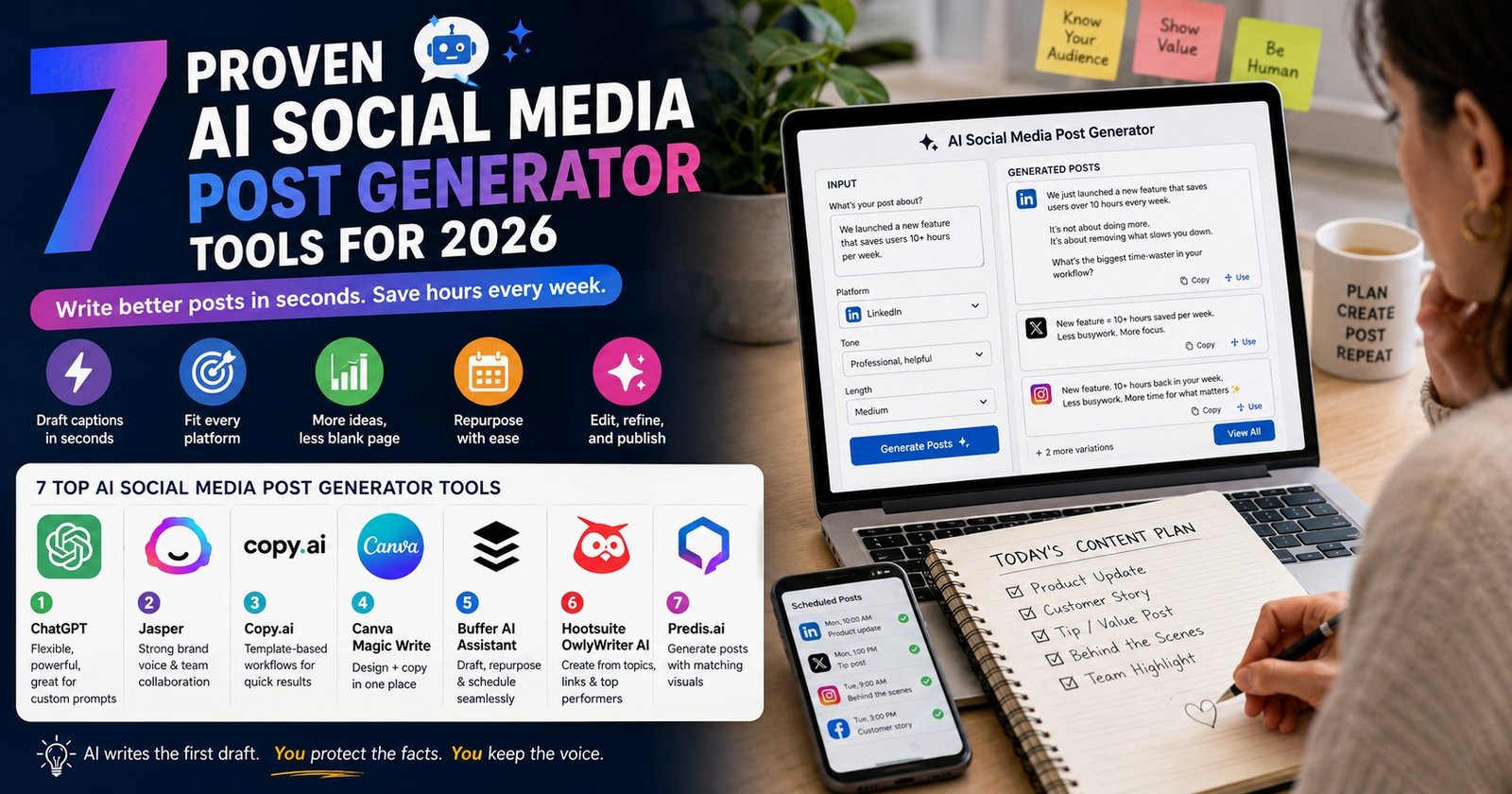
An AI social media post generator is a tool that writes captions, hooks, and hashtags for you. You give it a topic, a tone, and a platform. It returns several ready drafts in seconds. Strong options include ChatGPT, Jasper, Copy.ai, Canva Magic Write, Buffer AI Assistant, Hootsuite OwlyWriter AI, and Predis.ai. The drafts still need a human edit before you publish.
What Is an AI Social Media Post Generator?
Definition An AI social media post generator is software built on a large language model that turns a short brief into finished social copy. It handles the caption, the opening hook, the call to action, and often the hashtags. Some tools also build the matching image or video.
An AI social media post generator does not invent your message. It shapes a message you already have into the format each platform expects.
That difference matters. If you feed it nothing, you get bland copy. If you feed it a real fact, a real offer, or a real customer question, you get something worth posting.
People search for this under many names. You will see AI post generator, social media content generator, AI caption writer, and AI post maker. They describe the same category of tool.
Key Takeaways
- An AI social media post generator saves time on drafting, not on thinking.
- The quality of your input decides the quality of your output.
- Free tiers exist on most tools, and they are enough for a solo creator.
- Google does not ban AI content, but it does reward helpful content.
- Always edit for facts, voice, and claims before you hit publish.
How an AI Social Media Post Generator Works
Under the hood, most of these tools follow the same five steps.
- You give a brief. This can be a topic, a link, a blog post, or a product detail.
- The tool adds context. It applies your chosen platform, tone, and length. Some tools also load your saved brand voice.
- The model drafts options. A language model predicts the most likely useful text for that brief.
- The tool formats the result. It trims to the platform limit, adds line breaks, and suggests hashtags or emoji.
- You edit and approve. You fix facts, cut fluff, and match your own voice.
Step five is the one people skip when they first try an AI social media post generator. It is also the one that separates posts that perform from posts that read like filler.
What These Tools Do Well, and Where They Fail
Being honest about both sides saves you wasted hours.
Where an AI social media post generator performs well:
- Turning one long article into ten short posts
- Writing five hook variations for the same idea
- Rewriting a post to fit a different platform and length
- Fixing grammar and tightening long sentences
- Translating a caption into another language
- Beating the blank screen at the start of a session
Where it falls short:
- It invents facts, statistics, and quotes that sound real
- It does not know your customers or your last week of sales
- It repeats the same sentence patterns across dozens of posts
- It leans on tired phrases that readers now recognise instantly
- It cannot judge whether a topic is risky for your brand right now
Treat any AI social media post generator output as a first draft from a fast junior writer. Useful, quick, and never final.
7 Proven AI Social Media Post Generator Tools
These tools are widely used and actively maintained. Pricing and features change often, so confirm the current plan on each site before you commit.
1. ChatGPT
The most flexible option. It is not sold as an AI social media post generator at all, which is exactly why it works for so many jobs.
You can paste a blog post and ask for ten LinkedIn hooks. You can hand it your last five best posts and ask it to copy that rhythm. You can ask it to argue against your own draft.
Best for people who like writing prompts. Weakest for people who want a one-click button.
2. Jasper
Jasper is built for marketing teams. Its main strength is brand voice. You upload examples of your writing, and it holds that tone across campaigns.
It also supports approval workflows, which matters when several people post under one brand name.
Best for agencies and in-house teams. Priced above what most solo creators need.
3. Copy.ai
Copy.ai works as an AI social media post generator built around short-form marketing copy and repeatable workflows. It ships with templates for captions, ads, and product launches.
The template approach suits people who do not want to learn prompting. Pick the template, fill the fields, generate.
4. Canva Magic Write
Canva combines design and copy in one place. Magic Write drafts the caption while you build the graphic beside it.
For many small businesses, this is the practical choice. One tool covers the visual and the words, and the free tier is generous.
5. Buffer AI Assistant
Buffer added an AI social media post generator directly into its scheduler. You draft, repurpose, and queue the post without switching tabs.
You can read what the team built on the Buffer AI Assistant page. The value here is not the writing quality alone. It is that publishing sits one click away.
6. Hootsuite OwlyWriter AI
OwlyWriter works the same way inside Hootsuite. It can generate posts from a topic, from a link, or from your best performing past content.
That last feature is genuinely useful. Feeding a tool your own winners is the fastest route to output that sounds like you.
7. Predis.ai
Predis is an AI social media post generator built around visual output. It generates the caption and the carousel or video together from a single prompt.
Useful for Instagram and TikTok first brands. Review the visuals carefully, since automated design can drift off brand quickly.
Comparison Table: 7 Tools at a Glance
| Tool | Best For | Writes Copy | Makes Visuals | Built-In Scheduling | Free Tier |
|---|---|---|---|---|---|
| ChatGPT | Flexible prompting | Yes | Yes | No | Yes |
| Jasper | Brand voice at scale | Yes | Limited | Via integrations | Trial only |
| Copy.ai | Template workflows | Yes | No | No | Yes |
| Canva Magic Write | Design plus copy | Yes | Yes | Yes | Yes |
| Buffer AI Assistant | Publishing speed | Yes | No | Yes | Yes |
| Hootsuite OwlyWriter | Reusing top posts | Yes | No | Yes | Trial only |
| Predis.ai | Visual-first posts | Yes | Yes | Yes | Yes |
Real Example: One Update Turned Into Four Posts
Here is an actual run, not a made-up case study. The brief was a single sentence about a fictional but realistic product change.
The input: "We cut our onboarding from 14 steps to 4. Average setup time dropped from 25 minutes to 6. Write four posts for LinkedIn, X, Instagram, and a follow-up comment. Plain language. No hype words."
LinkedIn draft: "We deleted 10 onboarding steps last month. Setup went from 25 minutes to 6. The lesson was not that we added anything clever. We removed the questions we never used the answers to. What is the one step in your product that nobody actually needs?"
X draft: "Onboarding: 14 steps down to 4. Setup: 25 minutes down to 6. We did not build a shortcut. We deleted the questions we never used."
Instagram draft: "Old setup: 25 minutes. New setup: 6 minutes. Same product. We just stopped asking for things we never looked at. Swipe for the four steps that survived."
Follow-up comment draft: "For anyone asking which steps went: three address fields, two survey questions, and five settings that already had sensible defaults."
Notice what happened. The facts came from the human. The AI social media post generator handled the length, the rhythm, and the platform fit. That split is the whole point.
Notice the second thing too, because it applies to every tool on this list. Every draft is usable, and not one of them is finished. The LinkedIn version needs a real example. The Instagram version promises a carousel someone has to build.
How to Use an AI Social Media Post Generator: 9 Steps
- Collect real inputs first. A number, a customer question, a mistake you made, or a result you got.
- Pick one platform per generation. Copy written for all platforms at once fits none of them.
- Name the tone in plain words. Say "direct and calm" instead of "engaging."
- Give it a bad example. Tell it which phrases to avoid. This removes most of the robotic feel.
- Ask for five versions. Volume is where these tools win. Judgement is where you win.
- Cut the weakest three. Do this before you edit anything.
- Rewrite the first line yourself. The hook decides the reach, so keep that part human.
- Check every fact. If the tool produced a number you did not supply, delete it or verify it.
- Log what performed. Feed your top posts back into the tool next month as examples.
Best Practice Box Never let an AI social media post generator produce a statistic, a customer quote, or a claim about results. Those must come from you. Use the tool for structure, phrasing, and speed. Keep every factual claim under human control, especially in regulated fields like health, finance, and legal services.
Free vs Paid: What You Actually Get
| Feature | Free Tools | Paid Tools |
|---|---|---|
| Monthly output | Usually capped | High or unlimited |
| Brand voice memory | Rare | Standard |
| Team approvals | No | Yes |
| Scheduling included | Sometimes | Usually |
| Analytics link-up | No | Yes |
| Best fit | Solo creators | Teams and agencies |
A solo creator posting five times a week rarely needs a paid plan. A team of four posting for six clients almost always does. The break point is approvals, not writing quality.
Matching Posts to Each Platform
Formats differ, so the same caption should not go everywhere unchanged. Limits do change, so check the current rules in each app.
| Platform | Rough Caption Limit | What Works | Tone |
|---|---|---|---|
| About 3,000 characters | Lessons, numbers, opinions | Professional, plain | |
| X | 280 characters on free accounts | One sharp idea | Short, direct |
| About 2,200 characters | Story plus visual | Warm, personal | |
| Very long allowed | Community updates | Conversational | |
| TikTok | Short captions | Hook in first second | Casual, fast |
A useful habit is to ask your AI social media post generator to write for the tightest platform first. Cutting an idea to 280 characters forces clarity. Expanding it afterwards is easy.
Who Should Use an AI Social Media Post Generator?
Not everyone needs one. Here is an honest read on who benefits.
Strong fit:
- Solo founders who post often and write slowly
- Small teams covering several platforms with no dedicated writer
- Agencies producing high volume for multiple clients
- Creators repurposing long content into short posts
- Anyone writing in a second language
Weaker fit:
- Brands with a very distinctive personal voice
- Regulated industries where every claim needs legal review
- Accounts posting once a week, where drafting is not the bottleneck
If you post twice a month, an AI social media post generator will not change much. If you post daily across four platforms, it can save several hours a week.
The deciding question is simple. Is drafting the slow part of your process, or is deciding what to say the slow part? These tools only help with the first one.
AI Social Media Post Generator vs Hiring a Copywriter
Many small teams weigh these two options against each other. They solve different problems.
| Factor | AI Social Media Post Generator | Freelance Copywriter |
|---|---|---|
| Speed | Seconds | Days |
| Monthly cost | Free to moderate | Higher |
| Original strategy | No | Yes |
| Understands your customers | No | Yes, over time |
| Volume capacity | Very high | Limited |
| Needs your review | Always | Sometimes |
The strongest setup is usually both. A writer sets the voice, the angles, and the pillars once. An AI social media post generator then produces variations inside those rules week after week.
That order protects quality. Reversing it, where the tool sets the direction and a human tidies it afterwards, is how brands end up sounding like everyone else.
Where AI Tools Fit Into a Wider Marketing Stack
An AI social media post generator handles one small piece of the job. Most teams that get real results from AI use several tools that hand work to each other.
If your posts include video, our guide to the top AI avatar tools for multilingual voiceovers shows how to reach viewers in other languages without filming again. When organic posts start converting, the natural next step is paid, and our list of the best AI tools for Facebook and Instagram ad creatives covers what actually moves ecommerce numbers.
Posting well creates replies, and replies need answering. Our breakdown of AI-powered chatbot platforms explains which setups handle direct messages without sounding cold. Teams building a full stack from scratch can start with our list of top SaaS tools for startups.
For B2B brands, social posting often feeds a pipeline. The best sales intelligence tools for B2B contact data help you identify who is worth following up. Larger organisations planning a company-wide rollout may want outside guidance, which our review of top AI consulting firms covers in detail.
Two further reads matter if AI is becoming part of your career or your company policy. Our guide to AI product manager jobs maps a role many marketers move into. And our analysis of AI transformation as a problem of governance explains why approval rules decide whether adoption succeeds or quietly fails.
One caution before you buy anything. Plenty of tools promoted online cannot be verified at all. We looked into exactly that in our investigation of the Abraham Quiros Villalba AI tool keyword. Check that a product has a working site, real documentation, and named people behind it before you connect it to your accounts.
Does Google Penalise AI-Generated Posts?
This question comes up constantly, so here is the plain answer.
Google has said its focus is on the quality of content, not the method used to produce it. Its guidance on Google Search and AI content makes clear that automation used to manipulate rankings is against its spam policies, while helpful content produced with AI assistance is not automatically penalised.
Social platforms take a similar line. They care about spam behaviour, engagement bait, and undisclosed ads far more than they care about which software typed the caption.
The practical risk is simpler than a penalty. Generic AI copy gets ignored by people. Low engagement then reduces reach on its own, with no policy involved.
7 Mistakes to Avoid
- Publishing the first draft. The first output is the most average thing the model can say.
- Letting it invent numbers. Made-up statistics damage trust and can create legal risk.
- Using the same tone everywhere. LinkedIn and TikTok reward opposite voices.
- Posting more just because it is easier. Volume without a point trains your audience to scroll past.
- Skipping disclosure on paid posts. AI does not remove your advertising obligations.
- Feeding it private customer data. Check the data policy before pasting anything sensitive.
- Judging by output quality alone. Choose the AI social media post generator that fits your workflow, not the one with the best demo.
Teaching a Tool Your Brand Voice
Brand voice is where most AI social media post generator setups either work or fall apart. Three steps fix it.
- Collect ten of your best posts. Real ones that performed, not aspirational examples.
- Write a short voice rule set. For example: short sentences, no exclamation marks, no words like "unlock" or "elevate," always end with a question.
- Paste both into the tool every time. Or save them in the brand voice feature if the tool has one.
This takes 20 minutes once and improves every output afterwards. Most people skip it, then blame the software.
Frequently Asked Questions
Final Thoughts
An AI social media post generator is a drafting tool, not a strategy. It removes the slow part of posting and leaves the important part with you.
Start with one AI social media post generator and one platform. Feed it a real fact from your week. Ask for five versions, keep one, and rewrite the opening line yourself.
Do that for a month and you will notice something useful. The tool gets faster to work with, and your posts start sounding more like you, not less.