Quick Answer
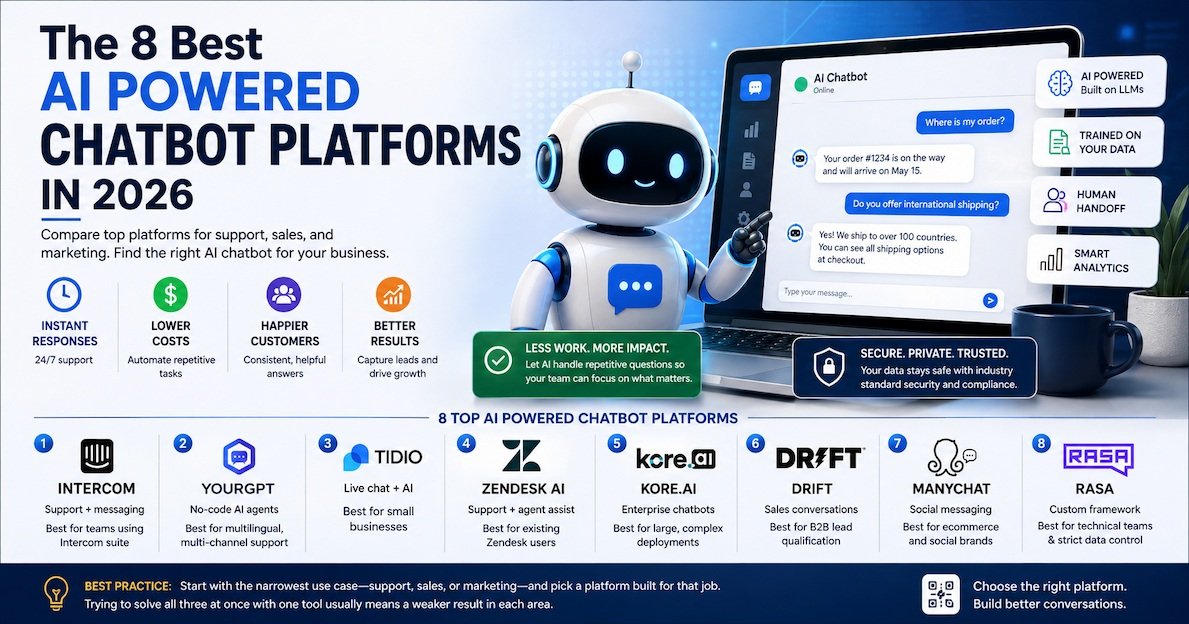
AI powered chatbot platforms are tools businesses use to build chatbots that answer questions, handle support tickets, and guide customers, without a developer writing every response by hand. The best options in 2026 include Intercom, YourGPT, Tidio, Zendesk AI, Kore.ai, Drift, ManyChat, and Rasa. Each one fits a different need, from simple website chat to full enterprise support automation.
What Makes a Chatbot "AI Powered" in 2026
A chatbot used to mean a simple script. You typed a question, and it matched keywords to a pre-written answer. If your question did not match, you got stuck in a loop.
That is not what most AI powered chatbot platforms do anymore. Today's tools run on large language models, the same technology behind ChatGPT and Claude. This means the chatbot can read your website, your help docs, or your product data, and answer questions in natural language, even ones it was never directly trained to expect.
This shift matters for any business looking at AI powered chatbot platforms today. You are not just buying a script. You are buying a system that understands context and gets better as it sees more real conversations.
Key Takeaway: Modern AI powered chatbot platforms are built on large language models, not fixed scripts. This is why they can answer unexpected questions instead of just matching keywords.
What Is an AI Powered Chatbot Platform
Definition: An AI powered chatbot platform is software that lets a business build, train, and deploy a chatbot using artificial intelligence. The chatbot draws on a large language model plus the business's own data, like website content, documents, or product catalogs, to answer questions and complete simple tasks in a conversational format.
Most platforms in this category share a few core parts:
- A way to train the bot on your own content, usually by uploading documents or linking a website
A chat widget for website or channel integration, such as a website popup, WhatsApp, or Slack, that lets visitors ask questions and get help directly while browsing.
- Some way to hand off to a human when the bot cannot help
- Analytics to see what people are asking and where the bot struggles
Why Businesses Use AI Chatbot Platforms
Businesses turn to chatbot platforms for a few clear reasons:
- Faster response times. A chatbot answers instantly, day or night, without waiting for a support agent to be free.
- Lower support costs. One well-trained bot can handle a large share of repeat questions, freeing up human agents for harder cases.
- More consistent answers. A bot pulls from the same source every time, so answers do not vary by which agent picks up the chat.
- Better lead capture. Sales-focused bots can qualify a website visitor and route them to the right person automatically.
None of this means a chatbot should replace your entire support team. Most businesses use AI chatbot platforms to handle the repetitive questions, while people focus on the complex ones.
8 Best AI Powered Chatbot Platforms
Pricing changes often in this space, so treat the numbers below as a general guide and confirm current pricing on each site.
1. Intercom
Intercom combines a chatbot with a full customer messaging platform. Its AI agent, Fin, can answer support questions using your help center content and hand off smoothly to a human agent when needed. It fits businesses that already use Intercom for email and in-app messaging.
Best for: Companies that want AI support tied into a broader customer messaging suite.
Pros:
- Strong handoff between bot and human agents
- Deep integration with help center content
- Detailed analytics on bot performance
Cons:
- Pricing can add up for smaller teams
- Best value comes from using the full Intercom suite, not just the bot
2. YourGPT
YourGPT is a no-code platform for building AI agents trained on your own data, like website links, documents, and videos. It supports over 100 languages and connects to channels like WhatsApp, Messenger, Instagram, and Slack, which makes it flexible for global support teams.
Best for: Teams that want a no-code setup with strong multilingual support.
Pros:
- No coding required to launch a bot
- Wide channel coverage in one platform
- Multilingual support out of the box
Cons:
- Less suited to highly custom, code-heavy builds
- Newer platform compared to some established players
3. Tidio
Tidio is a lighter option built for small and mid-sized businesses. It combines live chat with an AI chatbot layer, so a human agent can step in at any point during a conversation. Setup is simple, which makes it a common starting point for smaller online stores.
Best for: Small businesses that want an easy first chatbot without a steep learning curve.
Pros:
- Simple setup, good for non-technical teams
- Affordable entry pricing
- Works well for ecommerce and small support teams
Cons:
- Fewer advanced automation features than enterprise platforms
- Less suited to complex, multi-department support needs
4. Zendesk AI
Zendesk AI adds chatbot and agent-assist features on top of the well-known Zendesk support platform. It can suggest replies to human agents, summarize long ticket threads, and automate simple, repetitive requests.
Best for: Support teams already using Zendesk for ticketing who want to add AI on top.
Pros:
- Tight integration with existing Zendesk workflows
- Useful agent-assist features, not just customer-facing bot replies
- Strong reporting tied to existing support metrics
Cons:
- Full value requires already being on the Zendesk platform
- Can feel like an add-on rather than a standalone chatbot tool
5. Kore.ai
Kore.ai is built for large-scale, custom chatbot deployments. It gives enterprise teams more control over conversation design, integrations, and deployment across many channels at once.
Best for: Large organizations that need custom logic and enterprise-grade deployment.
Pros:
- Handles complex, multi-step conversation flows
- Strong enterprise integrations and security features
- Scales across many channels and departments
Cons:
- Overkill for small businesses or simple use cases
- Requires more setup time than lighter platforms
6. Drift
Drift focuses on sales conversations rather than general support. Its chatbot qualifies website visitors, books meetings, and routes hot leads to a sales rep in real time, which makes it popular with B2B marketing teams.
Best for: Sales and marketing teams that want to convert website traffic into booked meetings.
Pros:
- Strong at lead qualification and meeting booking
- Built with B2B sales workflows in mind
- Good integration with common CRM tools
Cons:
- Less focused on general customer support use cases
- Pricing tends to fit mid-size and larger sales teams better
7. ManyChat
ManyChat is built around messaging platforms like Instagram, Facebook Messenger, and WhatsApp. It is a strong fit for ecommerce and social-first brands that want to run automated conversations where their customers already spend time.
Best for: Ecommerce and social media brands running chat marketing campaigns.
Pros:
- Deep focus on social and messaging channels
- Good for marketing automation, not just support
- Simple visual flow builder
Cons:
- Less suited to complex internal or enterprise support needs
- Primary strength is social channels, not website-only support
8. Rasa
Rasa is an open-source framework rather than a plug-and-play platform. It gives development teams full control over conversation logic, data handling, and infrastructure, which matters for businesses with strict privacy or customization needs.
Best for: Technical teams that need full control over how the chatbot works and where data lives.
Pros:
- Full control over logic, data, and hosting
- Strong fit for regulated industries with strict data rules
- No dependency on a single vendor's roadmap
Cons:
- Requires development resources to set up and maintain
- Not a fit for teams that want a fast, no-code launch
Best Practice: Start with the narrowest use case that matters most, support, sales, or marketing, and pick a platform built for that job. Trying to solve all three at once with one tool usually means a weaker result in each area.
Comparison Table: AI Powered Chatbot Platforms
| Platform | Main Use | Best For | Coding Required |
|---|---|---|---|
| Intercom | Support + messaging | Teams using Intercom suite | No |
| YourGPT | No-code AI agents | Multilingual, multi-channel support | No |
| Tidio | Live chat + AI | Small businesses | No |
| Zendesk AI | Support + agent assist | Existing Zendesk users | No |
| Kore.ai | Enterprise chatbots | Large, complex deployments | Some |
| Drift | Sales conversations | B2B lead qualification | No |
| ManyChat | Social messaging | Ecommerce and social brands | No |
| Rasa | Custom framework | Technical teams, strict data control | Yes |
How to Choose the Right AI Chatbot Platform
Follow these steps to narrow the list down instead of picking based on brand recognition alone.
- Define the main job first. Support, sales, or marketing each point to a different platform.
- Check what channels your customers actually use. A platform built for social messaging will not help if most of your traffic comes through your website.
- Decide how much control you need. No-code tools launch faster. Frameworks like Rasa take longer but give more control.
- Look at your existing stack. If you already use Zendesk or Intercom, adding their AI layer is often simpler than switching to a new platform.
- Test with real questions. Before launching, run the bot through your most common customer questions and see how it handles the ones with no clear answer.
- Plan for human handoff. Decide upfront when and how the bot passes a conversation to a person, before you go live.
Key Takeaway: The best AI powered chatbot platform is not the one with the most features. It is the one that fits your main use case, your existing tools, and your team's technical comfort level.
Real Example: How a Small Ecommerce Brand Might Use These Tools
A small online store getting a growing number of "where is my order" messages could set things up this way:
- Start with Tidio to handle simple order-status and shipping questions directly on the website.
- Connect ManyChat to automate common questions coming through Instagram and WhatsApp, where a lot of customer messages already arrive.
- Use built-in analytics from both tools to spot the top five questions the bot cannot answer well, then update the bot's training content to close those gaps.
- Set a clear rule that any message mentioning a refund or complaint gets routed straight to a human agent, instead of letting the bot attempt it.
This kind of setup, start small, connect the channels customers already use, then refine based on real gaps, tends to work better than launching one large, all-purpose bot on day one.
How AI Chatbot Platforms Actually Work Behind the Scenes
It helps to understand the basic flow before you evaluate specific tools. Most AI powered chatbot platforms follow a similar process:
- You feed the bot your content. This usually means uploading documents, linking your website, or connecting a help center.
- The platform breaks that content into chunks. Instead of reading your entire website every time, the bot searches for the most relevant pieces of content for each question.
- A large language model generates the answer. The model combines the relevant content with the customer's question to write a natural-sounding response.
- The platform checks confidence. Many tools have a threshold. If the bot is not confident in its answer, it hands the conversation to a human instead of guessing.
- The conversation gets logged for review. This is how teams spot gaps in the bot's training content over time.
This process is sometimes called retrieval-augmented generation, or RAG for short. It is the reason modern AI powered chatbot platforms can answer specific questions about your business instead of giving generic responses.
Definition: Retrieval-augmented generation (RAG) is a method where a chatbot searches a knowledge source for relevant information before generating a response. This keeps answers grounded in your actual content instead of relying only on the model's general training.
AI Chatbots vs Traditional Rule-Based Bots
Many businesses still confuse AI powered chatbot platforms with the older, rule-based bots from a few years ago. The difference matters when you are choosing a tool.
| Factor | Rule-Based Bots | AI Powered Chatbot Platforms |
|---|---|---|
| How they answer | Match keywords to fixed scripts | Generate natural language answers from your data |
| Handling new questions | Fails or loops if no match found | Can respond to questions it was not explicitly trained for |
| Setup time | Requires mapping every conversation path | Faster setup using existing content like docs or a website |
| Maintenance | Manual updates to scripts | Improves as you add more source content |
| Best fit | Very narrow, simple use cases | Support, sales, and marketing at almost any scale |
Rule-based bots still have a place for very narrow, predictable tasks. But most businesses evaluating AI powered chatbot platforms today want the flexibility that comes with a language-model-based system.
Pricing Ranges to Expect
Pricing across AI powered chatbot platforms varies a lot depending on features and scale. Here is a general sense of what to expect, though you should always confirm current numbers on each provider's site.
- Small business tools like Tidio often start in the $20 to $50 per month range for basic AI features.
- Mid-market platforms like Intercom or Drift typically range from $100 to $500 per month depending on volume and seats.
- Enterprise platforms like Kore.ai usually require a custom quote based on channels, volume, and integrations.
- Open-source frameworks like Rasa have no license fee, but you pay in developer time and hosting costs instead.
Best Practice: Do not compare tools on sticker price alone. A cheaper tool that needs constant manual fixes can cost more in staff time than a pricier tool that mostly runs itself.
Security and Data Privacy Considerations
Chatbots often handle sensitive information, order details, account questions, or personal data. Before picking a platform, check a few basics:
- Where is the data stored? Some platforms let you choose a hosting region, which matters for compliance in certain industries.
- Does the vendor train on your data? Ask directly whether your conversation data is used to train shared models across other customers.
- What happens during a handoff? Confirm the chat history transfers cleanly to a human agent, so customers do not have to repeat themselves.
- Is there an audit trail? For regulated industries, being able to review exactly what the bot said and why can matter for compliance.
These questions matter more for platforms handling healthcare, finance, or other regulated data, and less for a simple FAQ bot on a small marketing site.
Common Mistakes Businesses Make With AI Chatbot Platforms
- Launching without testing edge cases. A bot that only handles easy questions well can frustrate customers with harder ones.
- Skipping the human handoff plan. Customers get frustrated fast when a bot loops without a clear way to reach a person.
- Not updating training content regularly. Product changes, policy updates, and new FAQs need to be fed back into the bot.
- Choosing based on features instead of use case. A feature-heavy enterprise platform can be more setup than a small team actually needs.
- Ignoring analytics after launch. The data on what customers actually ask is the best guide for improving the bot over time.
Frequently Asked Questions
It is software that lets businesses build chatbots using artificial intelligence, trained on their own data, to answer questions and automate simple tasks in a conversational format.
Pricing varies widely. Small business tools like Tidio start affordably, while enterprise platforms like Kore.ai typically require a custom quote.
Not fully. Most businesses use AI chatbot platforms to handle repetitive questions, while human agents focus on complex or sensitive cases.
No, for most platforms. Tools like YourGPT and Tidio are no-code. Frameworks like Rasa do require development resources.
A no-code platform can go live in days. Custom enterprise deployments often take several weeks to set up and test properly.
It is a method where the chatbot searches your content for relevant information before answering, so replies stay grounded in your actual business data.
Final Thoughts
AI powered chatbot platforms have moved well past the scripted bots of a few years ago. The right choice depends on your main goal, whether that is support, sales, or marketing, and how much control your team needs over the setup. Start with the platform that fits your biggest, clearest need, then expand once you know exactly where the gaps are.
If you are exploring more AI tools for customer-facing work, see our guide on the best AI tools for Facebook and Instagram ad creatives for ecommerce, or check out our roundup of top AI avatar tools for multilingual voiceovers for more ways AI is changing customer communication.
For a deeper technical look at how large language models power modern chatbots, see OpenAI's overview of how ChatGPT works.