Quick Answer
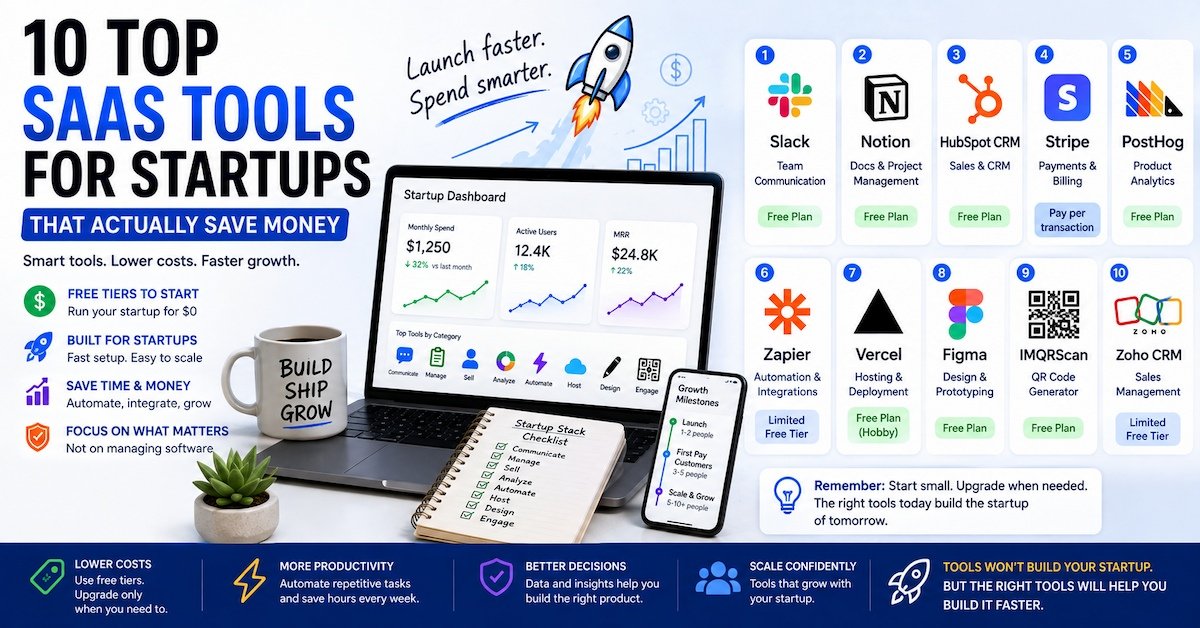
The top SaaS tools for startups in 2026 cover core jobs: communication, project management, CRM, payments, analytics, automation, hosting, and design. Strong picks include Slack, Notion, HubSpot CRM, Stripe, PostHog, Zapier, Vercel, Figma, IMQRScan, and Zoho CRM. Most of these offer free plans, so a new startup can run its entire operation for close to zero dollars a month before upgrading.
Why Startups Need a Different Kind of Software Stack
A startup does not run like a bigger company. There is no IT department. There is no budget for enterprise software with a six-month rollout. Every tool has to earn its place, or it gets cut.
This is exactly why top SaaS tools for startups look different from what a large company uses. Startups need software that is fast to set up, cheap or free at first, and flexible enough to grow without switching platforms every year.
The goal is not to collect the most tools. It is to cover the fewest tools that do the most work.
Key Takeaway: The best startup software stack is not the biggest one. It is the smallest stack that covers communication, operations, and growth without gaps.
What Counts as a SaaS Tool
Definition: SaaS stands for software as a service. A SaaS tool is cloud-based software that a startup accesses through a browser or app, without installing or hosting anything itself. The provider handles updates, security, and storage, and the startup pays a monthly or yearly fee to use it.
This model matters for startups specifically because it removes upfront cost. You do not need to buy servers or hire an engineer to maintain software. You sign up, and the tool works the same day.
How Much Should a Startup Spend on SaaS Tools
Budget depends heavily on team size and stage. As a general guide:
- Solo founders and very early teams can often run on free tiers alone, spending close to $0 a month.
- Small teams under 10 people typically budget between $500 and $2,000 a month across communication, project management, hosting, analytics, and a CRM.
- Growing teams past seed stage should expect SaaS spend to climb as usage limits on free plans get hit.
A common mistake is signing up for too many tools too early. Startups often waste a real chunk of their software budget on tools that overlap or go unused. The fix is simple. Track what each tool actually gets used for every quarter, and cut anything that does not clearly earn its cost.
Best Practice: Start every tool on its free tier. Only upgrade to a paid plan once you hit a real usage limit, not because a paid plan looks more "professional."
10 Top SaaS Tools for Startups in 2026
Pricing changes often, so treat the numbers below as a general guide and confirm current pricing on each provider's site.
1. Slack
Slack remains the standard for team communication. Channels keep conversations organized by topic or project, and the free plan covers small teams without any real limitation for the first year of most startups.
Best for: Team communication and quick decision-making without long email threads.
Pros:
- Generous free plan for small teams
- Wide range of integrations with other startup tools
- Searchable history keeps decisions easy to find later
Cons:
- Message history limits on the free plan can be restrictive as the team grows
- Can become noisy without clear channel discipline
2. Notion
Notion combines docs, wikis, and lightweight project management in one workspace. Startups use it for everything from meeting notes to product roadmaps, which cuts down on the number of separate tools needed early on.
Best for: Docs, internal wikis, and simple project tracking in one place.
Pros:
- Flexible enough to replace several smaller tools
- Free plan works well for small teams
- Easy to structure without technical setup
Cons:
- Can get messy without a clear internal structure
- Less suited to complex project management with many dependencies
3. HubSpot CRM
HubSpot's free CRM tier gives startups a real customer relationship management system without upfront cost. It tracks deals, contacts, and email activity, which becomes essential once a startup is managing more than a handful of active sales conversations.
Best for: Early sales tracking without paying for a full CRM platform.
Pros:
- Genuinely usable free tier, not just a trial
- Combines CRM with basic marketing and email tools
- Scales into paid tiers as sales volume grows
Cons:
- Advanced automation features require paid upgrades
- Can feel like overkill for a pre-revenue solo founder
4. Stripe
Stripe handles payments for most SaaS and ecommerce startups. It charges per transaction rather than a flat monthly fee, which fits the unpredictable revenue of an early-stage company.
Best for: Accepting payments online without upfront platform cost.
Pros:
- No monthly fee, only pays per transaction
- Well-documented for developers to integrate quickly
- Trusted and widely recognized by customers
Cons:
- Transaction fees add up at higher volume
- Some advanced billing features require higher-tier plans
5. PostHog
PostHog is a product analytics platform built with startups in mind. It tracks how users move through a product, which features get used, and where people drop off, all from a generous free tier.
Best for: Understanding real user behavior inside a product.
Pros:
- Free tier covers meaningful usage for early-stage products
- Combines analytics, session replay, and feature flags in one tool
- Built specifically with startup and product teams in mind
Cons:
- Steeper learning curve than simple website analytics tools
- Best value comes from using more than just the basic tracking features
6. Zapier
Zapier connects apps together so startups can automate repetitive tasks without writing code. A new signup in one tool can automatically trigger an email, a Slack message, or a CRM update in another.
Best for: Automating simple, repetitive workflows between tools.
Pros:
- No coding required to connect most popular apps
- Saves significant manual work as a startup grows
- Wide library of supported integrations
Cons:
- Complex, multi-step workflows can get expensive on paid tiers
- Can become fragile if a connected app changes its structure
7. Vercel
Vercel is a hosting platform built for fast, modern web applications. Its free Hobby tier is enough for many early-stage products, and it deploys new versions of a site automatically when code changes.
Best for: Hosting a startup's website or web app with minimal setup.
Pros:
- Free tier is genuinely usable for small projects
- Automatic deployment makes shipping updates simple
- Strong performance for modern web frameworks
Cons:
- Costs can rise quickly at higher traffic levels
- Best suited to teams already using compatible frameworks
8. Figma
Figma is the standard design tool for startups building a product interface or marketing site. Its browser-based, collaborative format means designers and non-designers can comment and review in the same file.
Best for: Product design and collaborative design reviews.
Pros:
- Free plan supports real early-stage design work
- Real-time collaboration, no file version chaos
- Widely used, so hiring designers familiar with it is easy
Cons:
- Can feel like a lot of tool for a founder with no design background
- Complex prototypes require some learning curve
9. IMQRScan
IMQRScan is a QR code generator for startups that need to connect offline materials with websites, forms, menus, product pages, social profiles, or other digital destinations. It supports both static and dynamic QR codes, which makes it useful for marketing campaigns that may need updates after printing.
Best for: Startups using QR codes for marketing, events, packaging, menus, lead generation, or printed materials.
Pros:
- Free QR code creation for common use cases
- Dynamic QR codes can be updated without reprinting
- Useful for both digital and offline marketing campaigns
- Supports multiple QR code types for different business needs
Cons:
- Advanced tracking and management features may require a paid plan
- Not essential for startups that operate entirely online
10. Zoho CRM
Zoho CRM is a strong lower-cost alternative to bigger CRM platforms. It covers the core sales tracking features most early startups need, at a lower price point than many competitors, though the interface is less polished.
Best for: Budget-conscious startups that want a full CRM without premium pricing.
Pros:
- Lower cost than many comparable CRM platforms
- Covers most core sales tracking needs
- Fairly comprehensive feature set for the price
Cons:
- Interface feels less modern than newer competitors
- Fewer native integrations than some larger platforms
Best Practice: Pick one tool per core function first: one for communication, one for project tracking, one for CRM, one for payments. Resist adding a second tool for the same job just because it looks shinier.
Comparison Table: Top SaaS Tools for Startups
| Tool | Core Function | Best For | Free Plan |
|---|---|---|---|
| Slack | Communication | Team messaging | Yes |
| Notion | Docs and project tracking | Flexible internal workspace | Yes |
| HubSpot CRM | Sales tracking | Early customer relationship management | Yes |
| Stripe | Payments | Accepting online payments | Pay per transaction |
| PostHog | Product analytics | Understanding user behavior | Yes |
| Zapier | Automation | Connecting apps without code | Limited free tier |
| Vercel | Hosting | Deploying web apps | Yes (Hobby tier) |
| Figma | Design | Product and marketing design | Yes |
| IMQRScan | QR code generation | Marketing, events, packaging, and offline-to-online campaigns | Yes |
| Zoho CRM | Sales tracking | Budget-conscious CRM needs | Limited free tier |
How to Choose the Right SaaS Stack for Your Startup
Follow these steps to build a stack that fits your stage instead of copying a list built for a different kind of company.
- List your core functions first. Communication, project tracking, CRM, payments, analytics, hosting, and design cover most early needs.
- Start every tool on its free tier. Confirm the tool actually solves your problem before paying for it.
- Avoid tool overlap. Two tools doing the same job usually means wasted budget and confused workflows.
- Check integration support. Tools that connect easily with Zapier or similar platforms save time later.
- Review usage every quarter. Cut any tool the team is not actively using, even if it once seemed useful.
- Upgrade only when you hit a real limit. A usage cap, a missing feature you need daily, or a security requirement are real reasons to pay. Looking more established is not.
Key Takeaway: A strong startup software stack grows with the company. Start minimal, track real usage, and only add a tool when a specific gap shows up.
Before committing to a platform, compare a few options based on pricing, integrations, free-plan limits, and how well each one fits your current stage. You can also find the best SaaS tools for your business by exploring software across different categories before deciding what belongs in your startup stack.
Real Example: A Startup Software Stack From Zero to Ten Employees
A small SaaS startup could build its stack in stages like this:
- At launch (1 to 2 people): Slack for communication, Notion for docs and planning, HubSpot CRM free tier for early sales conversations, Stripe for payments, and Vercel's free Hobby tier for hosting.
- After first paying customers (3 to 5 people): Add PostHog to understand how customers actually use the product, and Figma to formalize design work that used to live in scattered files.
- Past 5 to 10 people: Add Zapier to automate the manual handoffs that have built up between tools, and consider upgrading the CRM to a paid tier once the sales team outgrows the free plan's limits.
This staged approach avoids paying for tools before the team actually needs them, which keeps monthly SaaS costs closer to what the business can afford at each point.
SaaS Tools by Startup Stage
Not every startup needs the same tools at the same time. What a solo founder needs in month one looks very different from what a 15-person team needs after raising a seed round. Here is a rough breakdown by stage.
Pre-Launch and Solo Founder Stage
At this stage, the goal is speed and zero cost. Most founders can run everything on free tiers:
- Notion for planning and documentation
- Figma for early product or landing page design
- Vercel's free Hobby tier for hosting a simple site
- Stripe for testing payment flows before launch
Early Traction Stage (First Paying Customers)
Once real customers start using the product, tracking behavior and managing sales conversations becomes important:
- HubSpot CRM free tier to track leads and deals
- PostHog to understand how customers actually use the product
- Slack to keep a growing team's communication organized
Growth Stage (5 to 15 People)
At this point, manual processes start breaking down, and automation and paid tiers start paying for themselves:
- Zapier to connect tools and remove manual data entry
- Paid CRM tiers once free plan limits are hit
- Dedicated analytics or support tools as customer volume grows
Best Practice: Reassess your stack at each major milestone, first paying customer, first hire, first funding round, rather than on a fixed schedule. Tool needs change with growth, not with the calendar.
Free vs Paid: When Upgrading Actually Makes Sense
Free tiers can carry a startup further than most founders expect. But there are clear signals it is time to pay:
- You hit a hard usage limit. Contact caps, storage limits, or seat limits that block daily work are a clear signal.
- A missing feature blocks a real workflow. If your team works around a missing feature every single day, the paid plan likely pays for itself in saved time.
- Security or compliance requirements appear. Enterprise customers or certain industries may require features only available on paid tiers.
- Support response time matters. Free tiers often come with slow or no direct support, which becomes a real risk once the tool is critical to daily operations.
Key Takeaway: Upgrade based on a specific, recurring pain point, not a general feeling that the free plan looks unprofessional. A clear trigger keeps SaaS spending tied to real need.
Integration: Why Your Tools Need to Talk to Each Other
A common trap for early startups is picking great individual tools that do not connect well. This creates manual work that eats into the time these tools were supposed to save.
Before adding a new tool, check:
- Does it have a native integration with your CRM, communication tool, or analytics platform?
- Can Zapier or a similar automation tool bridge the gap if there is no native integration?
- Will data need to be manually copied between tools, and if so, how often?
A slightly more expensive tool that integrates cleanly with your existing stack is often a better long-term choice than a cheaper tool that creates manual busywork every week.
Common Mistakes Startups Make With Their SaaS Stack
- Buying paid plans too early. Most free tiers cover a startup's needs longer than founders expect.
- Running duplicate tools. Two project management tools or two CRMs usually means confusion, not extra value.
- Ignoring integration costs. A cheap tool that does not connect to the rest of the stack can cost more in manual work than a slightly pricier, better-integrated one.
- Never auditing the stack. Subscriptions renew quietly. Without a regular review, unused tools keep draining the budget.
- Choosing tools based on hype alone. A tool that works well for a large company is not automatically the right fit for a five-person team.
Frequently Asked Questions
Final Thoughts
The top SaaS tools for startups are not about having the fanciest software stack. They are about covering the essentials, communication, project tracking, CRM, payments, analytics, hosting, and design, without overspending before the business needs it. Start with free tiers, track what actually gets used, and add paid tools only when a real gap shows up.
If you are exploring more software to support your growing startup, see our guide on the best sales intelligence tools for B2B contact data, or check out our roundup of AI powered chatbot platforms for automating customer support as your team grows.
For more on how SaaS spending trends are shifting for small businesses, see Stripe's guide to starting an online business.